Short announcements: sports day has moved, the canteen is closed on Friday, the book week parade is on Wednesday. The newsletter carries the long version; this is the quick one.
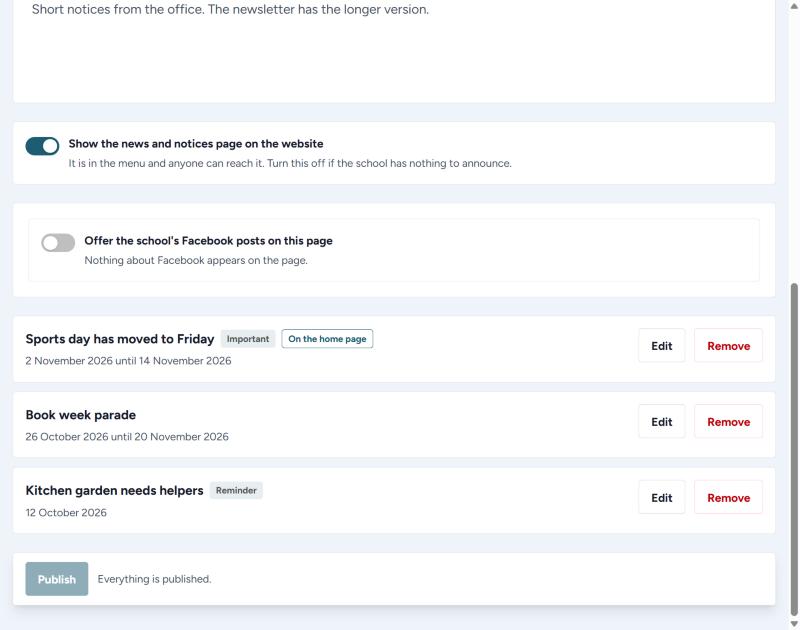
Adding a notice
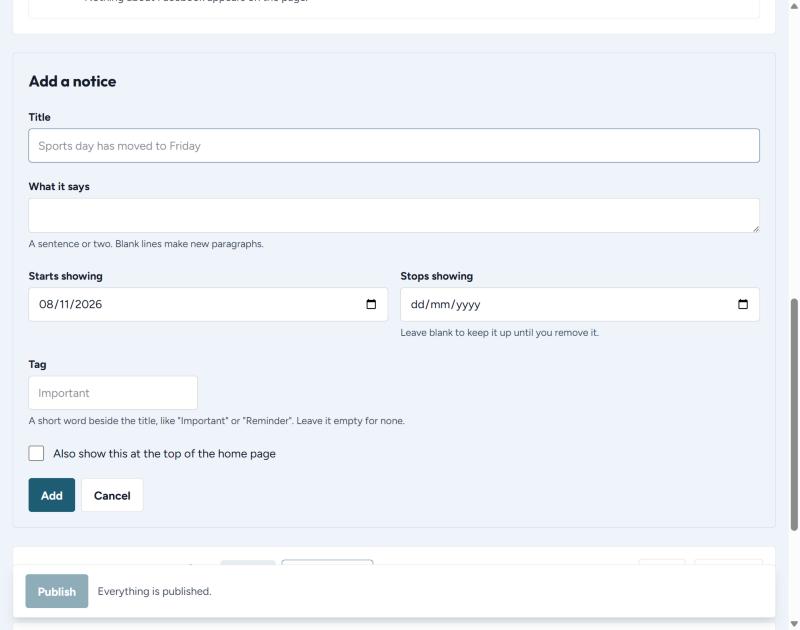
- Press + Add notice.
- Title — a short line, such as "Sports day has moved to Friday".
- What it says — a sentence or two. Leave a blank line to start a new paragraph.
- Starts showing — today, unless you are writing it in advance.
- Stops showing — the day it stops being true. Leave it blank to keep it up until you remove it.
- Tag — one short word beside the title, such as "Important" or "Reminder". Leave it empty for none.
- Tick Also show this at the top of the home page for something nobody should miss.
- Press Add, then Publish.
Use the "Stops showing" date
It is the single most useful box on this screen. A notice about a sports day in March should not still be on the website in June, and with a stop date you do not have to remember to take it down.
The two switches
- Show the news and notices page on the website — turn it off if the school has nothing to announce. The page leaves the website and the menu, and no notice is lost.
- Offer the school's Facebook posts on this page — if your school has a Facebook page, paste its address and visitors can see the posts here. Copy the address from the bar at the top of your browser when you are on the school's page, not a link to one post.